


free
fast
sustainable
simple
special
personal
From the invitation to the overview of all responses in four steps.
In the past, invitations used to say „u. A. w. g.“—a reply is requested. Today, replies come in all over the place via WhatsApp, phone calls, and voice messages, and in the end, no one knows for sure who’s coming. With feierly, your guests can reply right where all the information is: directly on the invitation.
This works for any occasion, from Birthday about the Wedding up to the Team Christmas Party. For more information on sending messages via WhatsApp, see our WhatsApp Invitation Cards.
Design an invitation: Select an event and template without logging in, then enter the date, location, and text. The buttons for RSVPs and cancellations appear automatically.
Share this link: Sign up for a free account to save the link and send it via WhatsApp, in a group chat, or by email.
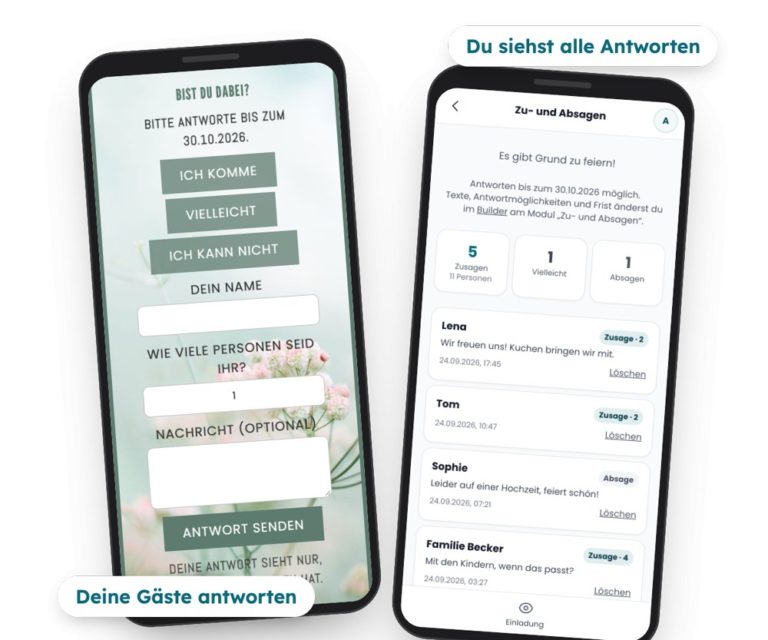
Guests respond: Tap „I’m coming,“ „Maybe,“ or „I can’t,“ then enter your name—and, if you’d like, the number of people and a message. No app, no account required.
View replies: You can see all the answers with their counts in the app, and if you want, you can get an email when new ones are posted.
Confirmations, people, "maybe" responses, and cancellations—all at a glance instead of across twenty chats.
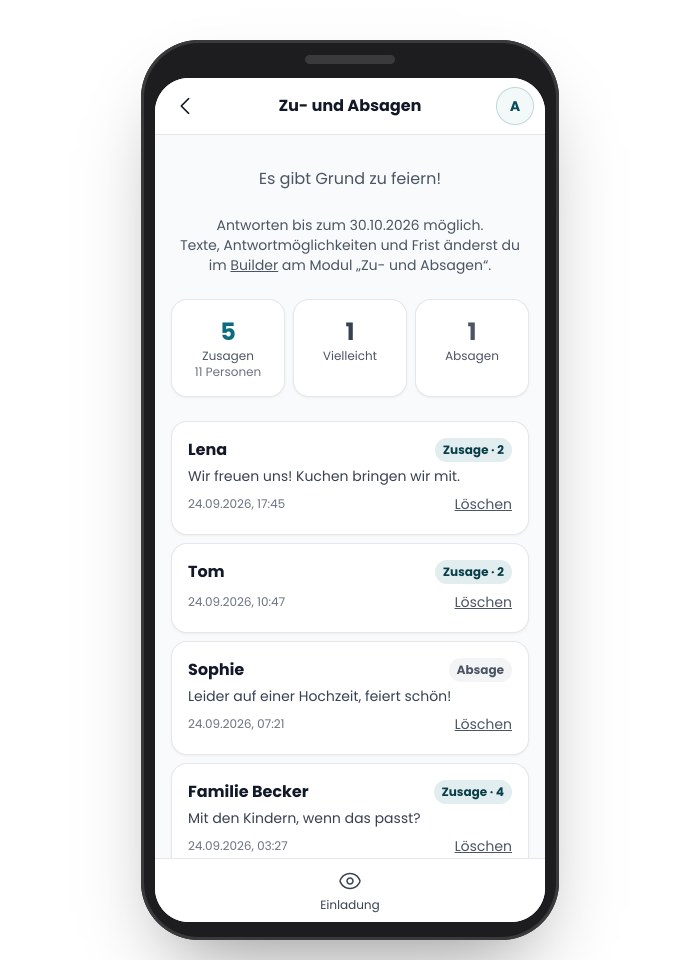
In the app, you'll see a list of all the responses to your invitation: name, response, number of guests, and your guest's message. At the top are the counters, for example, „5 RSVPs, 11 guests.“ This way, you can plan food, drinks, and seating without having to count everything again.
Custom button text: Instead of „I’m coming,“ how about „I’m in!“? You can edit all the text yourself.
Response deadline: You set a final response date. Your guests will see it above the buttons.
Just what you need: „Maybe,“ „I can't,“ the number of people, and the message can be turned off individually. You set the maximum number of people per response.
Email when there are new replies: Upon request, no more than once per hour.
Personal: Only the person who sent the invitation can see the responses. Guests provide only their names, not their email addresses.
Birthdays, children's birthday parties, weddings, baptisms, first day of school, barbecue parties, housewarming parties, or Christmas parties: At feierly, you'll find templates for almost any occasion. Choose a design, enter your information, and add your own photo if you'd like.
 New
New
 New
New
 New
NewAnd many more templates in the app!
Copy a text, fill in your details—your guests can reply right in the invitation.
What Changes When Your Guests Respond to the Invitation.
Responses distributed across one-on-one chats, group chats, and calls
You're in charge of keeping track of who's coming
You'll have to ask how many people are coming.
Late replies get lost in the chat
All the answers in one place
Counters for commitments and people
Response deadline listed directly on the invitation
Guests don't need an app or an account
Free
Free: RSVPs (acceptances and declines) with names, number of guests, and messages; a list of all responses and counters; custom button texts; the response deadline; and email notifications for new responses. Plus, create, customize, and share your invitation.
With Pro (one-time fee of €2.99 for free templates, €4.99 for premium designs): Up to five custom questions for your guests, as free-form text or with multiple-choice options—for example, regarding meal preferences. All responses as a spreadsheet (CSV) for Excel or Google Sheets. Plus a wish list and the invitation without the feierly notice. No subscription required.
Yes. Accepting and declining invitations, the list of all responses, the response deadline, and email notifications for new responses are free. Only asking your own questions and exporting data as a spreadsheet are included in the Pro plan (one-time fee of €2.99 to €4.99).
No. Your guests open the invitation in their browser and respond with a tap. They just enter their name, the number of people (if desired), and a message.
Not for creating. To save and share, create a free account using Google or your email address. You'll also be able to see all the answers there.
Yes. Your guest can change their answer later in the same browser on the same phone, as long as the response period is still open.
No. feierly doesn't send messages to your guests. If someone hasn't replied yet, it's best to send them a quick reminder in the chat—the link stays the same.
Only you, as the host. Your guests can see their own answers, but not those of others.
Yes. New invitations have these buttons automatically. For older invitations, add the „RSVPs“ module in the Builder.
Yes, with Pro. You can ask up to five of your own questions—either as free text or with multiple-choice options, such as meat, fish, or vegetarian. The answers appear in your list and can be downloaded as a table.
Last updated: September 24, 2026
